
Massive Dev Chart Timer
Freestyle Photo & ImagingPhotography
4.163.00 Reviews
- Version
- 4.6.9
- Installs
- 10.00K
- Age Rating
- Everyone
Screenshots
Our Review of Massive Dev Chart Timer
 Analysis by Appyee
In a darkroom, timing is more than a convenience: it helps keep each step of film development consistent, especially when your hands are occupied and the room is dim. Massive Dev Chart Timer is a photography app built around that particular job. I find its appeal easiest to understand if you already develop black-and-white film and want a dedicated timing companion rather than a general-purpose stopwatch.
Readable when the room is dim
The main benefit of a purpose-built darkroom timer is that it keeps the process in view while you work. Instead of switching between a timer and notes or trying to remember which step comes next, you can keep the development sequence close at hand. That can reduce mental load during a session, though a clear screen alone does not guarantee that every control will suit every user or every lighting condition.
It also helps to think about readability before a session starts. Check that you can comfortably see the screen and identify the controls in the light available to you; doing this before handling chemicals is less stressful than discovering a problem mid-step. If you already know your routine, having the sequence ready can make the app easier to follow than searching through a general timer while working.
First Impressions: The Look and Feel
Opening up the Massive Dev Chart Timer, I was immediately struck by its clean, intuitive interface. It’s like walking into a well-organized darkroom. The app greets you with a straightforward menu, which is a blessing when you’re trying to juggle multiple tasks in dim lighting. The color scheme is easy on the eyes, and the layout is designed to make navigation a breeze.
Features that Stand Out
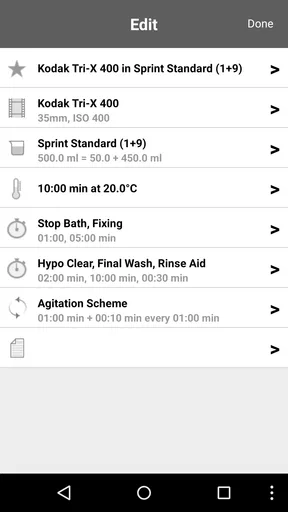
This app isn’t just a timer; it’s a comprehensive toolkit for film developers. Let’s dive into some of the standout features:
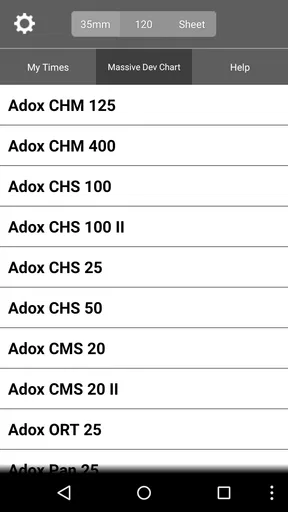
- Comprehensive Database: The app boasts an exhaustive database of film and developer combinations. Whether you're using Ilford HP5 with Rodinal or Kodak Tri-X with HC-110, the app has you covered.
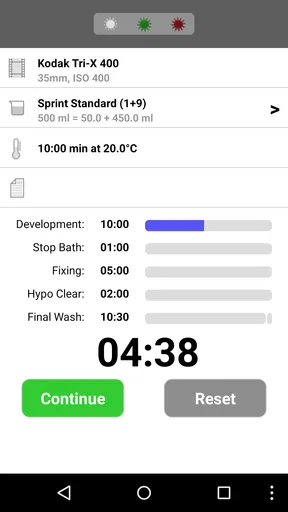
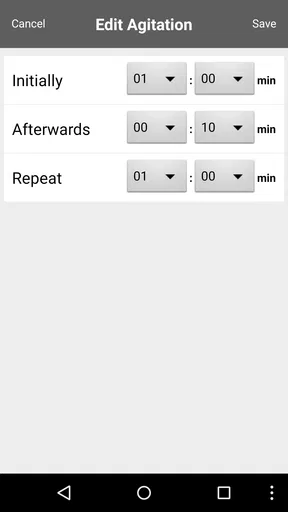
- Customizable Timer: You can set up multiple timers for different steps in the development process, including pre-soak, development, stop bath, and fix. It’s like having your own personal lab assistant.
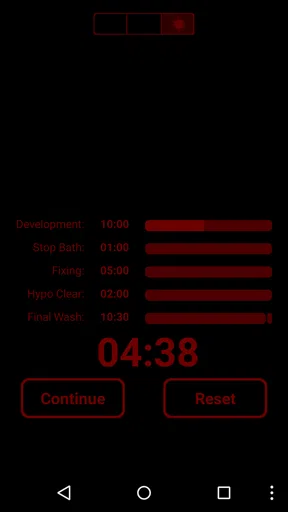
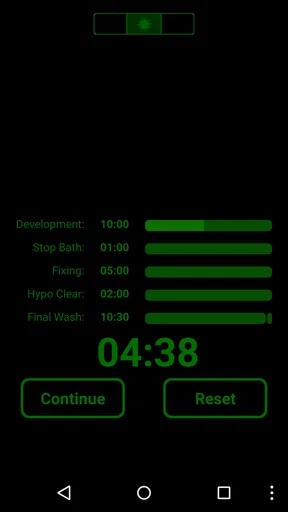
- Darkroom Mode: This feature dims the screen and changes the color to red, ensuring you don’t ruin your precious film with unexpected light leaks.
- Notes and Logs: Keep track of your development history and jot down notes for each session. Perfect for those who love to document their creative process.
Working through a session without losing your place
A useful way to get more from a development timer is to prepare the whole session before you begin. I’d check the film and developer pairing, review the planned steps, and make sure the times match the process I intend to use. Then, when the session is underway, I can spend less attention on the phone and more on the physical sequence: agitation, pouring, and changing solutions at the right moments.
For example, imagine arriving home with a roll you want to develop before the evening gets busy. A dedicated sequence can help you move through each timed stage without repeatedly checking a kitchen clock or calculating the next interval in your head. The practical advantage is not that an app makes chemical handling effortless; it is that a clear plan can reduce avoidable uncertainty while your attention is divided.
Putting It to the Test
So, how does it perform in a real-world setting? I put it through its paces with a roll of Kodak T-Max 400, using the classic D-76 developer. Setting up the timer was a breeze, and the app’s notifications kept me on track throughout the entire process. The darkroom mode was particularly handy, allowing me to focus on the task without any unnecessary distractions.
One feature I found particularly useful was the ability to adjust times on the fly. Sometimes, conditions in your darkroom might require slight adjustments, and the app accommodates that seamlessly. It’s like having a flexible friend who understands the nuances of film development.
A better fit than a stopwatch, but not for every photographer
Compared with a basic stopwatch, a film-development timer is more useful when you need to coordinate several stages and keep a repeatable routine. A stopwatch can be enough if you develop only occasionally and already have your timings written down. The specialized approach becomes more worthwhile when you work with different film and developer combinations or want session notes alongside your timing workflow.
That focus is also the app’s main trade-off. If you shoot only digital photographs, or send every roll to a lab, its darkroom-oriented tools will have little to do for you. And if you prefer to build a process from handwritten notes or a timer you already trust, a separate paid app may not improve your routine enough to justify changing it. I’d treat it as a practical aid, not a substitute for checking the instructions for the film and chemistry you are using.
Motor and sensory considerations
During a timed session, the phone is only one part of the task. You may be pouring liquids, handling tanks, and keeping track of several steps, so a workflow that demands frequent tapping or close reading can become frustrating. I’d set up what I can in advance and place the device somewhere stable and easy to glance at, rather than trying to operate it with wet hands or while carrying equipment.
Dim red-screen use may make the display less intrusive in a darkroom, but it is not a universal solution for sensory needs. Some people may find a bright display distracting, while others may need stronger contrast, larger text, or a different way to receive timing cues. I would test the screen and controls in the actual environment before relying on them for a full session. If seeing or touching the phone is difficult, a simple timer with controls you can operate comfortably may be a better companion.
Where It Could Improve
No app is perfect, and the Massive Dev Chart Timer is no exception. While the database is extensive, a few niche films and developers are missing. However, the app allows users to manually add these, which is a thoughtful touch. Additionally, while the interface is clean, some users might find it a tad simplistic. A few advanced customization options could take it to the next level.
Those limitations matter most when your workflow depends on a less common pairing or when you need a particular way to interact with the interface. Before committing to a new routine, I’d check whether the combinations you use are represented and whether the timer’s controls feel manageable on your device. Manual entry can help fill a gap, but it also means you need to enter and verify your own timings carefully rather than assuming every recipe is already there.
Price, platform, and who should consider it
Developed by Freestyle Photo & Imaging, this paid photography app costs $9.99. It has a 4.1 average from over 500 ratings, with more than 10,000 installs, and its content rating is Everyone. It first appeared on July 18, 2011; version 4.6.9 requires operating system 7.0 or later. Those details place it among established, specialized tools rather than casual camera add-ons, but the value still depends on whether you develop film often enough to use its focused workflow.
I’d recommend considering it if black-and-white development is a regular part of your photography and you want timings, steps, and session notes gathered around that task. A newcomer can also benefit from having a structured place to organize a session, provided they still learn the process and verify the chemistry instructions. Someone who develops rarely, shoots only digitally, or needs particular accessibility controls should compare it with a familiar stopwatch, written timing sheet, or another tool that better fits their habits.
The Final Verdict
All in all, the Massive Dev Chart Timer is a must-have for any film photography enthusiast. It simplifies the development process, allowing you to focus on what truly matters: creating stunning images. Whether you’re a seasoned pro or a curious newbie, this app will undoubtedly become an indispensable part of your toolkit.
So, if you’re ready to take your darkroom adventures to the next level, give the Massive Dev Chart Timer a download. Trust me, your negatives will thank you!
My inclusive verdict
I see this as a focused helper, not an all-purpose accessibility solution. Its darkroom-minded presentation and step-based timing can make a familiar film workflow easier to manage, particularly if you prepare before the session and know which controls work for you. But people who need specific text, contrast, audio, or one-handed interaction options should judge the app in their own setting instead of assuming a red screen or a simple menu will meet those needs.
If the app suits your vision, dexterity, and darkroom setup, it can take a repetitive timing burden off your mind. If it does not, choosing a simpler or more adaptable timer is a sensible decision, not a compromise in your photography. The right tool is the one you can use calmly and consistently while giving your film the care it needs.
Verdict
Strengths of Massive Dev Chart Timer
- Intuitive interface for easy navigation.
- Highly customizable timer settings.
- Extensive library of development times.
- Supports multiple film types and brands.
- Darkroom mode for low-light use.
Limitations of Massive Dev Chart Timer
- Limited to film photography use.
- No cloud sync for data backup.
- Occasional app crashes reported.
- No support for digital photography.
- Requires manual data entry for new films.
Similar Picks in This Category
View All
Google Photos
Google LLC4.4

Gallery
Google LLC4.2

Picsart AI Photo Editor, Video
PicsArt, Inc.3.9

B612 AI Photo&Video Editor
SNOW Corporation4.1

BeautyPlus-Selfie Photo Editor
PIXOCIAL TECHNOLOGY (SINGAPORE) PTE. LTD.4.5

Remini - AI Photo Enhancer
Bending Spoons4.1
Frequently Asked Questions
What is Massive Dev Chart Timer used for?
Massive Dev Chart Timer is designed for photographers who use traditional film development methods. It provides a comprehensive database of development times for various film and developer combinations, assisting users in accurately timing each stage of the development process. This is particularly useful for achieving consistent results in analog photography.
Is the Massive Dev Chart Timer app user-friendly for beginners?
Yes, Massive Dev Chart Timer is user-friendly, even for beginners. The app includes a well-organized interface with clear instructions and a vast database of film and developer combinations. New users can easily navigate the app and adjust development times as needed, making it a helpful tool for both novices and experienced photographers.
Can I customize development times in the Massive Dev Chart Timer app?
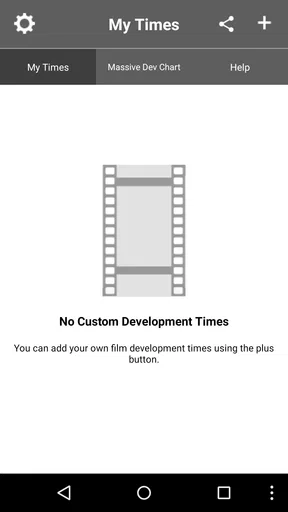
Absolutely. The app allows users to customize development times to suit their specific needs. You can adjust the times based on your personal preferences or specific film and developer combinations that are not listed in the database. This feature ensures flexibility and personalization in your film development process.
Does the app support multiple languages?
Currently, Massive Dev Chart Timer primarily supports English. However, the app’s intuitive design and straightforward visuals make it accessible to non-English speakers. Keep an eye on updates, as developers may introduce additional language support in future versions to enhance user accessibility.
Is an internet connection required to use the Massive Dev Chart Timer app?
No, an internet connection is not needed to use the core functions of the Massive Dev Chart Timer app. Once installed, the database and timer functions can be accessed offline, making it convenient for use in darkrooms where internet connectivity may be limited. However, updates or additional features may require internet access.
